


If you run a local business, you already know how powerful customer reviews can be. They build trust, improve conversions, and boost your visibility in local search
But here’s the problem — most small businesses struggle to display their best reviews on their websites.
That’s where Reviews On My Website comes in. It’s a simple, powerful tool that helps you embed Google, Facebook, and Yelp reviews directly on your website — in just a few clicks.

In this review, we’ll explore its key features, pricing, pros and cons, and whether it’s worth using in 2025.
✅ Quick Verdict:
Reviews On My Website is an affordable and easy-to-use solution for small businesses that want to showcase authentic customer reviews on their website and improve local SEO.
👉 Try Reviews On My Website Free
What is Reviews On My Website?
Reviews On My Website is a SaaS tool that allows businesses to collect, manage, and display online reviews from multiple sources such as Google, Yelp, Facebook, and TripAdvisor on the company website.
It’s designed for:
- Small businesses (restaurants, salons, dental clinics, etc.)
- Freelancers and web designers
- Marketing and SEO agencies managing multiple clients
Why it matters:
Embedding reviews on your site not only builds credibility but also helps with local SEO by adding fresh user-generated content and schema markup.
Key Features
Let’s look at what makes Reviews On My Website stand out:
1. Multi-Platform Review Aggregation
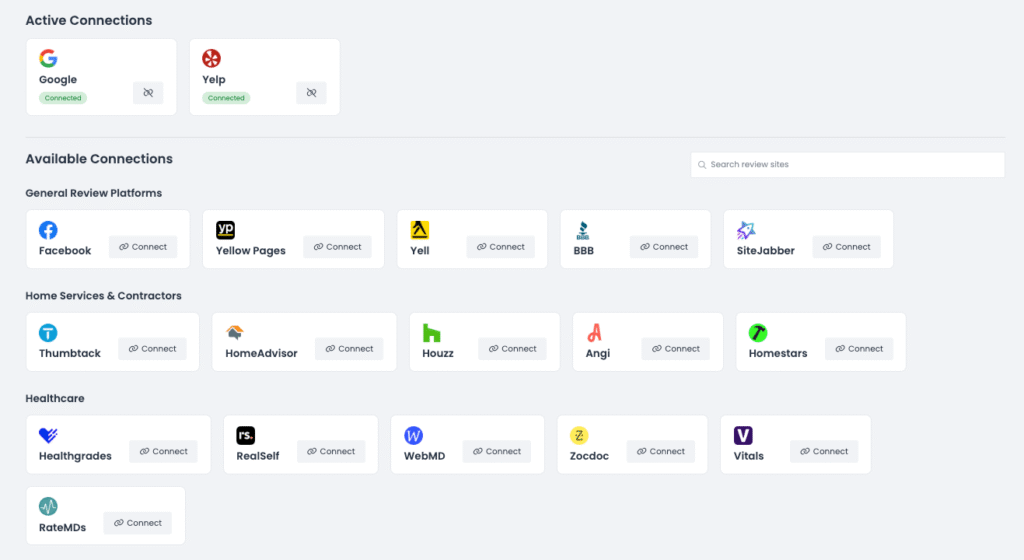
Connects to Google, Facebook, Yelp, TripAdvisor, and more so you can display all your best reviews in one place.
It also has a lot of industry-specific review websites that you can connect and show reviews from them on your website.
2. Customizable Widgets
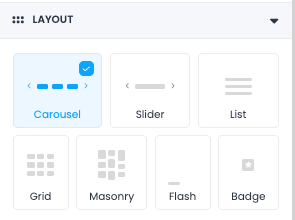
Choose from multiple layouts — list, grid, or carousel — and match colors and fonts with your branding.
You can also choose which platforms you want to import reviews from.
Let’s say you only want to import and display reviews from Facebook and not Google Business Profile, you can do that.
3. Auto-Sync Reviews
New reviews are automatically updated on your website without manual work.
You can have a ‘Reviews’ page on your website that displays all your reviews. Just embed the code once and forget it.
The tool will fetch and display all your reviews in your desired format.
4. Review Moderation
Control what gets displayed. You can hide low-quality or spam reviews to maintain a professional image.
For example, you can choose a setting where you will only display reviews when they are 4 stars or greater.
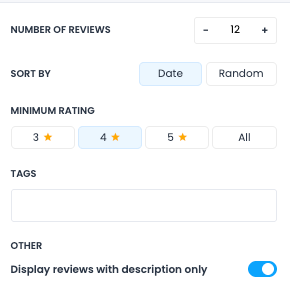
This way, you don’t need to worry about negative/false reviews being showcased on your website.
You can also choose only to display reviews with descriptions as some customers would just rate your profile and move on.
5. SEO-Friendly Schema Markup
Adds structured data so your ratings can appear in Google rich results — improving click-through rate and local ranking signals.
6. Easy No-Code Embed
You just copy and paste a short code snippet into your site (works with WordPress, Wix, Squarespace, Webflow, Godaddy etc)
💡 Growth Hack: Let’s say you want to showcase reviews only related to oil change on your oil change service page, it can be done easily using this tool.
Tag reviews related to Oil Change, create a widget and select the ‘Oil change’ tag to display. Embed the widget code in the oil change solution page and you will only see the reviews related to Oil Change.
Showing service-specific reviews increases relevance, boosts trust, and helps your service pages rank higher and convert better.
7. AI Review Response Generator
Automatically create smart, engaging replies to your customer reviews.
The tool analyzes each review and generates a response in your preferred tone and length.
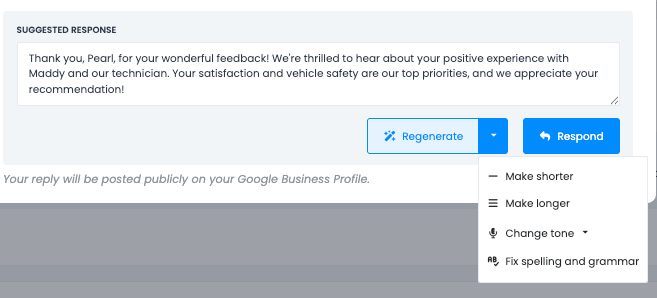
Edit if needed, hit approve, and it instantly publishes the reply to the review platform—saving you time while keeping your reputation polished and professional.
8. Analytics & Reporting
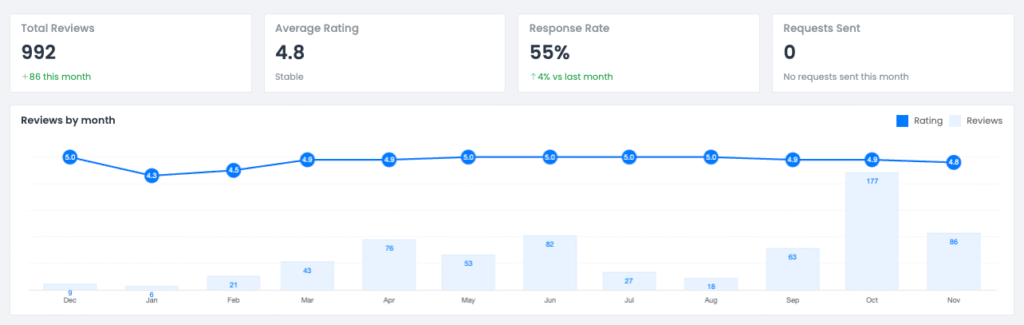
The reporting dashboard is clean, simple, and effortlessly easy to understand. It gives you exactly the insights you need—no clutter, no overwhelm, just clear data that helps you take action fast.
Ease of Getting Started
Getting started is incredibly simple.
Step 1: Create a free account
Step 2: Connect your review sources (Google, Facebook, Yelp)
Step 3: Customize your widget
Step 4: Copy and paste the embed code into your site
In less than 10 minutes, your reviews are live.
🧩 My experience:
Setup was smooth, and the interface is intuitive even for non-technical users. The preview updates in real time, making design edits easy.
Pricing Plans
One of the biggest strengths of Reviews On My Website is its affordable pricing.
| Plan | Price (Monthly) | Key Features | Best For |
|---|---|---|---|
| Free | $0 | Basic widget, limited reviews | Testing & small sites |
| Starter | $9/mo | Unlimited reviews, widget customization | Small businesses |
| Professional | $29/mo | Schema markup, auto-sync | Growing businesses |
| Agency | $59/mo | Multi-client dashboard | SEO agencies |
💰 Best Value: The Professional Plan offers the ideal balance of automation, design, and SEO benefits.
Pros and Cons
✅ Pros
- Easy setup and no coding required
- Very affordable compared to competitors
- SEO benefits with schema markup
- Supports multiple platforms
- Customizable and responsive widgets
⚠️ Cons
- Limited widget templates in lower tiers
- Advanced analytics only available in higher plans
Who Should Use Reviews On My Website
- Local service businesses: dentists, salons, restaurants, auto shops, etc.
- Agencies: Manage multiple client accounts and review management at one place.
- Freelancers: Web designers and marketers adding review widgets for clients.
Comparison with Alternatives
| Tool | Review Sources | Pricing | Key Difference |
|---|---|---|---|
| Reviews On My Website | Google, Facebook, Yelp | From $9/mo | Simple, affordable, SEO-friendly |
| Elfsight | Google, FB, IG | From $6/mo | More widget types, less focused on SEO |
| EmbedSocial | Google, FB, Instagram | From $29/mo | Advanced customization, higher price |
🏁 Verdict:
Reviews On My Website is the most straightforward solution for small businesses that want to embed authentic customer reviews without complex setup or high cost.
How Reviews On My Website Helps SEO
Embedding reviews isn’t just about design — it helps your site rank better. Here’s how:
- Adds fresh content: user reviews update automatically.
- Builds E-E-A-T: showcases real experiences and trust.
- Improves CTR: star ratings via schema markup attract more clicks.
- Boosts local relevance: reviews include location and service keywords.
Step-by-Step: How to Add It to Your Site
- Sign up for a free account on Reviews On My Website
- Connect your Google or Facebook page
- Customize widget layout and colors
- Copy the HTML embed code
- Paste it into your site’s footer, homepage, or sidebar
That’s it! Your reviews will appear instantly and auto-update as you get new ones.
Final Verdict
If you’re a local business owner, Reviews On My Website is a no-brainer.
It’s simple, affordable, and effective — helping you build trust, increase conversions, and boost SEO without hiring a developer.
⭐ Our Rating: 4.8/5
Great value for small businesses who want authentic social proof on their websites.
👉 Try Reviews On My Website for Free
FAQs
Q1. Is Reviews On My Website free?
Yes, there’s a free plan with basic features. You can upgrade anytime for more customization.
Q2. Does it work with WordPress?
Absolutely. It works with WordPress, Wix, Squarespace, Webflow, Shopify, and most CMS platforms.
Q3. Will it help with SEO?
Yes. The tool adds schema markup and user-generated content — both help improve SEO.
Q4. Can I choose which reviews to display?
Yes, you have full moderation control.
Q5. Can agencies use it?
Yes, the Agency plan allows managing multiple clients from one dashboard.
Conclusion
Reviews On My Website offers exactly what small businesses need — an effortless way to showcase social proof, improve credibility, and strengthen local SEO.
Whether you’re a solo business owner or managing clients, it’s one of the best review embed tools you can try in 2025.
👉 Start Your Free Trial of Reviews On My Website →
P.S. Some links are affiliate in this post. This means I’ll earn a small commission if you decide to use the recommended tool. I’m sharing this because you deserve to know this info. Even if you don’t go for it, I’m happy to feature this tool as I’ve been using it to grow my website and help my clients. 🙌